// JavaScript Document

/* <script type="text/javascript"> */
//<![CDATA[
//If using image buttons as controls, Set image buttons' image preload here true
//(use false for no preloading and for when using no image buttons as controls):
var preload_ctrl_images=true;

//And configure the image buttons' images here:
var previmg='left.gif';
var stopimg='stop.gif';
var playimg='play.gif';
var nextimg='right.gif';

var slides=[]; //FIRST SLIDESHOW
//configure the below images and descriptions to your own. 

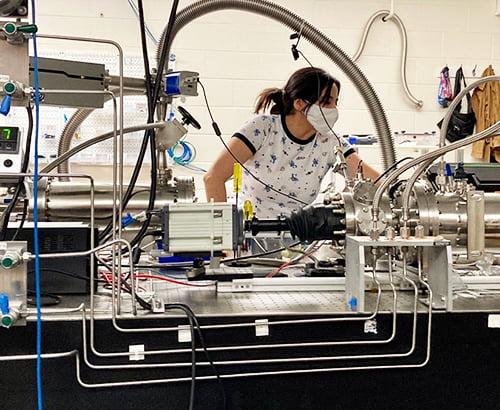
slides[0] = ["main/images/home/slideshow/picnic08_10.jpg", "2008 Annual Picnic", "http://www.uta.edu/physics/main/phys_news/events/2008/2008picnic/index.html", "_new"];
slides[1] = ["main/images/home/slideshow/hepcomp1_10.jpg", "High Energy Physics", "http://www-hep.uta.edu", "_new"];
slides[2] = ["main/images/home/slideshow/cloudchmbr_mp1_10.jpg", "Large Cloud Chamber", "http://www.uta.edu/physics/main/phys_news/events/2007/cloudchmbr/index.html"];
slides[3] = ["main/images/home/slideshow/cpb1_10.jpg", "Chemistry Physics", "http://www.uta.edu/planetarium", "_new"];
slides[4] = ["main/images/home/slideshow/phys_clinic1_10.jpg", "Physics Help Clinic", "http://www.uta.edu/physics/main/resources/clinics/index.html"];
slides[5] = ["main/images/home/slideshow/nbpg_pic1_10.jpg", "Nano-Bio Physics", "http://www.uta.edu/physics/main/faculty/wchen/", "_new"];
slides[6] = ["main/images/home/slideshow/homepg_img1_10.jpg", "Physics research", "http://www.uta.edu/physics/main/phys_research"];
slides[7] = ["main/images/home/slideshow/picnic07_10.jpg", "2007 Annual Physics Picnic", "http://www.uta.edu/physics/main/phys_news/events/2007picnic/index.html"];
slides[8] = ["main/images/home/slideshow/frphyslab1_10.jpg", "Freshman Physics Lab", "http://www.uta.edu/physics/labs/index.html", "_new"];
//above slide show uses only the defaults
slides.border=1; //set border width for images
slides.border_color='#002762'; //set border color for images
slides.no_descriptions=1; //use for no descriptions displayed

var slides2=[]; //SECOND SLIDESHOW
//configure the below images and descriptions to your own. 
slides2[0] = ["photo6.jpg", "Crucifix"];
slides2[1] = ["photo7.jpg", "Alter Boys"];
slides2[2] = ["photo8.jpg", "Young Pan"];
slides2[3] = ["photo9_thumb.jpg", "Mona Lisa"];
//optional properties for these images:
slides2.desc_prefix='<b>Description:<\/b>'; //string prefix for image descriptions display
slides2.controls_top=1; //use for top controls
slides2.counter=1; //use to show image count
slides2.width=140; //use to set width of widest image if dimensions vary
slides2.height=225; //use to set height of tallest image if dimensions vary
slides2.no_auto=1; //use to make show completely user operated (no play button, starts in stopped mode)
slides2.use_alt=1; //use for descriptions as images alt attributes
slides2.use_title=1; //use for descriptions as images title attributes
slides2.nofade=1; //use for no fade-in, fade-out effect for this show
slides2.border=2; //set border width for images
slides2.border_color='lightblue'; //set border color for images

var slides3=[]; //THIRD SLIDESHOW
//configure the below images and descriptions to your own, note optional links, target and window specifications. 
slides3[0] = ["1_side.jpg", "", "http://www.google.com", "_new", "top=250, left=300, width=500, height=300, location, resizable, scrollbars"];
slides3[1] = ["2_side.jpg", ""];
slides3[2] = ["3_side.jpg", "", "http://www.dynamicdrive.com"];
slides3[3] = ["5_side.jpg", "", "http://www.msn.com", "_new"];
//optional properties for these images:
slides3.no_descriptions=1; //use for no descriptions displayed
slides3.pause=1; //use for pause onmouseover
slides3.image_controls=1; //use images for controls
slides3.button_highlight='#cccccc'; //onmouseover background-color for image buttons (requires image_controls=1)
slides3.specs='width=300, height=250' //global specifications for this show's new window(s)
slides3.random=1; //set a random slide sequence on each page load
slides3.manual_start=1; //start show in manual mode (stopped)

//Notes:
//slides#.target will set a target for a slide group, will be overridden by slides#[#][3], if present
//slides#.specs will set new window specifications for a slide group, will be overridden by slides#[#][4], if present
//slides#.fadecolor will set fading images background color, defaults to white
//slides#.no_controls will set a slide show with no controls
//slides#.random will set a random slide sequence on each page load
//slides#.delay=3000 will set miliseconds delay between slides for a given show, may also be set in the call as the last parameter
//slides#.jumpto=1 will display added controls to jump to a particular image by its number
//slides#.no_added_linebreaks=1; use for no added line breaks in formatting of texts and controls

//use below to create a customized onclick event for linked images in a given show:
//slides#.onclick="window.open(this.href,this.target,'top=0, left=0, width='+screen.availWidth+', height='+screen.availHeight);return false;"
//]]>
/* </script> */