How to Schedule Exams
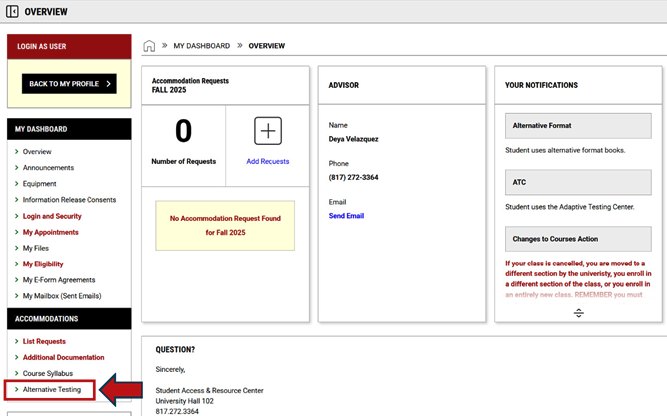
Login to student SAR Student Portal and click on the Alternative Testing link under the Accommodations tab.
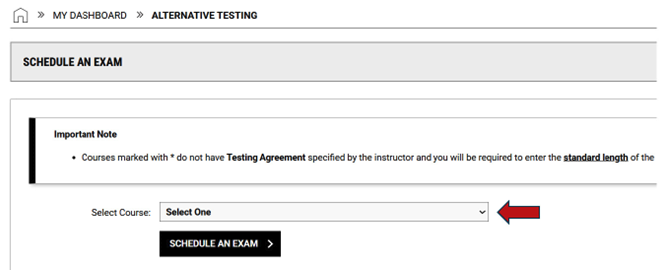
- Click the arrow on the dropdown menu to select a class. Then click Schedule an Exam.
-
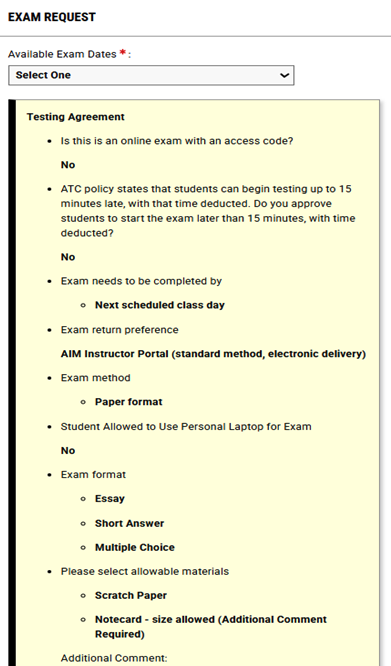
Be sure to read the instructions in the yellow box labeled Testing Agreement.
- Select an exam date from the dropdown menu.
- Use the information in the yellow Testing Agreement box to help determine the accommodations needed for the exam. ONLY select the accommodations needed and that pertain to the test format (i.e. paper) and the test style (i.e. multiple choice).
-
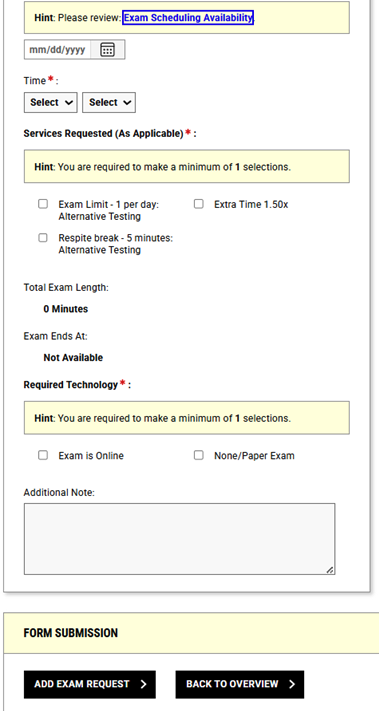
Fill in the details for the exam in the Exam Request box.
- Schedule the exam according to the class time or according to a time specified by faculty.
- Only choose an alternative exam date if your class schedule conflicts with the date specified by your faculty.
- Choose the accommodations needed for the exam in the box labeled Services Requested (As Applicable).
- Choose an option under the Required Technology section.
- Use the Additional Note box to provide important messages about your exam.
- Click Add Exam Request.
|
|
|
|