
Applicant Has No Background Check On File
An applicant or current employee who does not have a background check on file.

The University of Texas at Arlington requires Pre-Employment Background Checks (PEBCs) for certain applicants and employees as outlined in University policy. UTA partners with Background Connect, our authorized background check provider, to conduct pre-employment background screenings.
This guide helps hiring departments determine when a PEBC is required, who initiates the request, and what to expect throughout the process.
Once initiated, candidates will receive an email directly from Background Connect with instructions for completing their background check.
Hiring departments must complete and submit a PEBC Request Form for all candidates requiring a background check, including staff, faculty, student employees, volunteers, affiliates, and other hires.
Submit the completed form to hrcbc@uta.edu .
Once received, the appropriate TCE team will initiate the screening process with Background Connect.

A Pre-Employment Background Check may be required based on an individual's employment history or change in position at UTA.
For complete requirements and exceptions, review the Criminial Background Check Policy (HR-E-PO-01)





 The PEBC Process
The hiring department identifies the selected candidate and completes the appropriate hiring steps.
The hiring department completes the PEBC Request Form for the selected candidate and submits it to hrcbc@uta.edu. This requirement applies to staff, faculty, student employees, volunteers, affiliates, and other hires. Once the completed form is received, TCE will initiate the background check with Background Connect.
The candidate receives an email from BackgroundConnect with a secure link to begin the background check process.
The email will come from automation@instascreen.net. Candidates should check their spam or junk folder if they do not see the invitation.
The candidate follows the secure link and completes the required information, including:
Candidates should review their information carefully before submitting and save their Reference Number for future portal access.
BackgroundConnect conducts the required screening and returns the results to UTA for review.
Processing times may vary depending on the searches and verifications required.
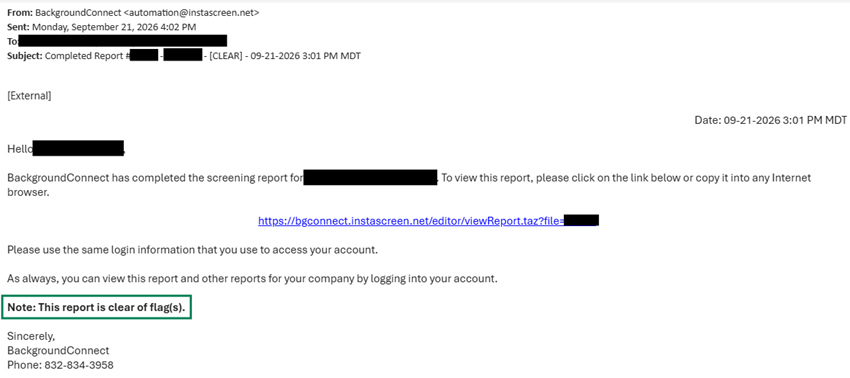
Once a background check has been completed and cleared, the designated hiring contact will receive an automated email confirming that the candidate is approved to proceed with the hiring process.
View Sample Notifications
SAMPLE 1

SAMPLE 2
If a background check requires additional review, the TCE Background Check team will review the results and may contact the hiring department and/or the candidate for additional information or clarification.
The hiring department will be notified if additional review is required and provided with any necessary next steps.
No action is needed from the hiring department unless contacted by TCE Background Checks.
If you are not receiving background check notifications and believe you should be listed as a hiring contact, email hrcbc@uta.edu for assistance.
Share the appropriate Background Connect guide with your candidate based on whether they have a U.S. Social Security Number (SSN).
Provide step-by-step instructions for completing a Backgroud Connect questionnaire and accessing the applicant portal.
Provides instructions for candidates completing a backgroun check without an SSN, including how to create and use a secure PIN.
The hiring department is responsible for completing and submitting a PEBC Request Form for every candidate requiring a background check, including staff, faculty, student employees, volunteers, affiliates, and other hires.
Submit completed forms to hrcbc@uta.edu.
Ask the candidate to check their spam or junk folder for an email from automation@instascreen.net. If they still cannot locate the invitation, contact the Background Check Team for assistance.
Candidates without a U.S. Social Security number can still complete a background check. Provide the candidate with the No SSN Applicant Guide for instructions.
Candidates experiencing technical issues or needing assistance with the Background Connect portal should contact Background Connect directly at info@backgroundconnect.com or 832-834-3958.
We're here to help.
Help with questionnaires, portal access, or technical issues.
info@backgroundconnect.com832-834-3958
Safe Hiring.
Every Step.